Over at NYC Resistor, it was getting cold, and we needed a doorbell so visitors wouldn’t be stranded outside when the building was locked. A standard wireless model didn’t work reliably (the space is on the fifth floor, just out of range), so various members generally resorted to writing their phone numbers on a sign on the front door when they were expecting guests.
Since almost everyone has a mobile phone already, and SMS-based solution seemed appropriate. In order to implement this we need two things:
- An SMS shortcode
- A system to notify when the shortcode is triggered
It’s irritating and expensive to acquire your own shortcode, but there are several services that will allow you to use one in exchange for a small fee or advertisements in your messages. TextMarks is my favorite (I used TextMarks for my WhereAmI project). While TextMarks markets their service as a system for mobile mailing lists, they allow you to reserve a keyword and define a behavior (that can include pulling data from a URL!) to occur when that keyword is triggered.
Configuring TextMarks
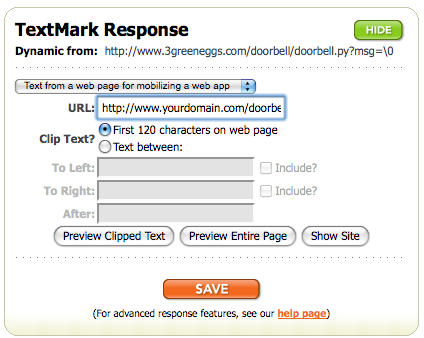 Sign up for TextMarks and choose a keyword. Configure the keyword to respond with the “First 120 characters on web page”, and point it at the future home of your script (you can always come back and modify this later).
Note the \0 as the value of the msg parameter — this instructs TextMarks to send along any additional message contents as the value of that parameter. That means if someone were to text 41411 “doorbell hi this is hilary”, TextMarks would call the script with the param msg=hi this is hilary. This can be quite useful.
The Script
This script is written in Python, but you can use any scripting language you like. This particular script just sends an e-mail to an account when the ‘doorbell’ is rung, but you could have it do pretty much anything up to and including ringing a real bell (which may be coming soon!).
#!/usr/bin/env python
# encoding: utf-8
"""
doorbell.py
Created by Hilary Mason, feel free to use this code in your own projects.
"""

import sys, os
import smtplib
import cgi
import cgitb; cgitb.enable()

class Doorbell(object):
	GMAIL_USERNAME = 'YOURGMAILACCOUNT@gmail.com'
	GMAIL_PASSWORD = 'YOURPASSWORD'

	def __init__(self, msg):
		message = """\
From: YOURGMAILACCOUNT@gmail.com
To: YOURGMAILACCOUNT@gmail.com
Subject: KNOCK KNOCK, someone is at the door!

%s
		""" % msg

		server = smtplib.SMTP('smtp.gmail.com:587')
		server.ehlo()
		server.starttls()
		server.ehlo()
		server.login(self.GMAIL_USERNAME, self.GMAIL_PASSWORD)
		server.sendmail('YOURGMAILACCOUNT@gmail.com', ['YOURGMAILACCOUNT@gmail.com'], message)
		server.quit()

		print "You knocked! You can also call us at 347-586-9270. <3, NYC Resistor"


if __name__ == '__main__':
	print "Content-Type: text/plain\n\n"

	form = cgi.FieldStorage()
	if 'msg' in form:
		w = Doorbell(form['msg'].value)
	else:
		w = Doorbell('There is an anonymous monkey at the door.')
And that’s it! Provided you have your keyword configured to point at your script, and the script living at an accessible address, you’ll get an e-mail whenever your SMS doorbell is rung and the person who sent the message will get back a cute response confirming their action.
Finally…
This setup can be easily extended such that a message containing ‘doorbell hilary’ could e-mail only me, or be forwarded to my phone.
I’m curious to see if having a remotely accessible ‘doorbell’ will encourage pranksters — we might need to add a password.
 Hilary Mason